This is it, folks. The final stretch of our run together. I want to thank you all for joining me as we've run, jogged, walked and occasionally crawled through the social web.
Please take a few moments to fill out our end-of-session survey -- it's even shorter than the Midway Survey! I'd prefer you did this online, but I will have a few paper copies on hand at our Finish Line celebration on December 2nd.
Speaking of which, you should have received your invitation to our party through Google invites, one of the functions of Google Calendar. If you haven't, please check your Gmail account and let me know if you need the invite sent again. I hope to see many of you there!
If you're interested in tools for online event organizing, you've got a few options to choose from. Evite was one of the first event invitation tools out there. It's free, separate from any email or calendaring system, and easy to use. Crush3r offers a similar service, but the display is a little clunky.
Meetup focuses on regular meetings and serial events. There's a fee for organizers who want to start a group, but none for folks to find one. Better still, you don't need to register with the site to find a group and get more information about it. CityCita is a comparable free service that focuses on the person searching for a group to meet, rather than on listed events.
Finally, Zanby is an interesting blend of a social network and an event planning site. It seems like a great tool for organzing large family gatherings....or Friends of the Library groups!
Discovery Activity
Please RSVP to the Google invitation. Yes, Maybe or Regrets...just let me know. (See, I promised you an easy last week!)
Now, at the end of our class, I'd like to share a video for the holidays that's just bursting with social web fun. Enjoy, and thank you for running with me!
Showing posts with label social web. Show all posts
Showing posts with label social web. Show all posts
Monday, November 24, 2008

Monday, November 17, 2008
Thing 23: The Internet Brought Back the Radio Star
Shaking loose the bounds of archived media, let's take a look at the wide variety of live media out on the internet. To keep things manageable, we'll focus on live audio streams; the number of live video streams (from the Times Square webcam to the NFL) is truly overwhelming.
 Traditional radio stations (such as NPR, WFNX, and WMJX over there) are increasingly providing access to their broadcasts online, though some do require you to register to to listen.
Radio Paradise is one of the giants of internet-only radio. Using just about any media player you have on your computer, you can listen to commercial-free, listener-supported alternative music radio. While you're listening, you can browse through a playlist of current and prior tracks, discussion forums and additional information about featured artists.
Moving from 1.0 to 2.0 streaming media, Pandora is a free online service powered by The Music Genome Project. First, you create a free account and 'seed' a radio station with music you like. As your station plays, Pandora will begin adding other music related to what you chose. You can give each song a thumbs-up or thumbs-down, move it to a more appropriate station, or find out why Pandora suggested the song. Over time, you can fine-tune your own stations and add to the data of the Genome Project.
Magnatune takes yet another tack by providing access to the music of independent artists around the world. You can either listen on a song-by-song basis, or play through a genre mix. Here's the World Music mix, just for Nancy V.
Last FM works on a related principle, and expands it to include video. From the Music or Videos tabs, you can browse popular hits or search for a specific artist or song. The Radio tab works like Pandora, creating a station for you based on an artist you request.
Seeqpod goes one step even further by including podcasts, Flash animation, slideshows, lectures, images and all sorts of playable media in their results. It really does give you pieces from the whole media pie:

Discovery Activity
Yup, you guessed it: choose one of the sites above, poke around a bit and report back on what you find. If you're already familiar with one of these services, please pick one that you haven't worked with before to explore.
To Go the Extra Mile, choose one of the more tradtional live audio sources (RadioParadise or an NPR affiliate) and one of the more social services and contrast the experience of listening to each of them. What do you like or dislike about each style; how engaged are you; what do you think of the songs you're listening to?
-------------
Housekeeping Note: I will be away from my computer from Thursday through Sunday of this coming week (11/20 - 11/23). I'll be checking email, but my response time may lag a bit. For those of you still looking to complete Thing 20, I promise to be online as much as possible once I return.
Now, just as the final leg of the Marathon is down an easy stretch of Boylston Street, so too shall this run through 2.0 wind down to the finish line. Our last set of Things will be another week of fun and games, starting with Thing 24: Itty Bitty Blogging. Keep on jogging, folks -- we're almost there!
 Traditional radio stations (such as NPR, WFNX, and WMJX over there) are increasingly providing access to their broadcasts online, though some do require you to register to to listen.
Radio Paradise is one of the giants of internet-only radio. Using just about any media player you have on your computer, you can listen to commercial-free, listener-supported alternative music radio. While you're listening, you can browse through a playlist of current and prior tracks, discussion forums and additional information about featured artists.
Moving from 1.0 to 2.0 streaming media, Pandora is a free online service powered by The Music Genome Project. First, you create a free account and 'seed' a radio station with music you like. As your station plays, Pandora will begin adding other music related to what you chose. You can give each song a thumbs-up or thumbs-down, move it to a more appropriate station, or find out why Pandora suggested the song. Over time, you can fine-tune your own stations and add to the data of the Genome Project.
Magnatune takes yet another tack by providing access to the music of independent artists around the world. You can either listen on a song-by-song basis, or play through a genre mix. Here's the World Music mix, just for Nancy V.
Last FM works on a related principle, and expands it to include video. From the Music or Videos tabs, you can browse popular hits or search for a specific artist or song. The Radio tab works like Pandora, creating a station for you based on an artist you request.
Seeqpod goes one step even further by including podcasts, Flash animation, slideshows, lectures, images and all sorts of playable media in their results. It really does give you pieces from the whole media pie:

Discovery Activity
Yup, you guessed it: choose one of the sites above, poke around a bit and report back on what you find. If you're already familiar with one of these services, please pick one that you haven't worked with before to explore.
To Go the Extra Mile, choose one of the more tradtional live audio sources (RadioParadise or an NPR affiliate) and one of the more social services and contrast the experience of listening to each of them. What do you like or dislike about each style; how engaged are you; what do you think of the songs you're listening to?
-------------
Housekeeping Note: I will be away from my computer from Thursday through Sunday of this coming week (11/20 - 11/23). I'll be checking email, but my response time may lag a bit. For those of you still looking to complete Thing 20, I promise to be online as much as possible once I return.
Now, just as the final leg of the Marathon is down an easy stretch of Boylston Street, so too shall this run through 2.0 wind down to the finish line. Our last set of Things will be another week of fun and games, starting with Thing 24: Itty Bitty Blogging. Keep on jogging, folks -- we're almost there!
Thing 22: Quick, to the Wayback Machine!...and everything else at Archive.org
The Internet Archive is a worldwide initiative to build a deep and broad repository of human cultural history in digital form with the participation of libraries, archives, research institutions, scholars and everyday folks. The Archive is open-access, meaning that everything contained in it is in the public domain and usually under a Creative Commons license.
The Wayback Machine preserves the way the Web was by periodically capturing 'snapshots' of the Internet. You can see a website's history by typing in the URL and choosing from the dates available. (I must say, the Boston Public Library's first home page wasn't very inspiring.)
The Moving Image Archive contains thousands of digital movies, including classic full-length films, alternative news broadcasts, and videos uploaded by Archive users. Among its treasures are the Prelinger Archives and the Machinima Archive.
The Live Music Archive is an amazing collection of concert recordings from bands obscure and famous. One of my favorite examples is the live recordings of Chucklehead, a now-defunct Boston-area band from the 1990s.
The Audio Archive is comprised of digital recordings of all sorts, from audiobooks and music to alternative news programs and poetry readings. Through the Netlabels collection, community-oriented 'virtual record labels' share their catalogs of signed and unsigned artists from around the world.
The Text Archive is open to anyone in the world, though it is the contributions of libraries scanning their public domain items that form the backbone of the collection. Of particular note is the Biodiversity Heritage Library, a joint effort of ten major natural history museum libraries, botanical libraries, and research institutions.
Finally, The Software Achive aims to preserve and provide access to legally downloadable software from around the web. They are also archiving (but not providing access to) copyright-protected software through the CLASP project; access will be granted to the archived materials as their copyrights expire.
Discovery Activity
Yes, you could spend hours roaming through any of these archives. Let's narrow things down by focusing on The Wayback Machine. Please search for your institution's URL and post a link to the earliest version in the archive.
To Go the Extra Mile, poke around in one of the media archives and share a treasure with us.
Now, let's round out our week of multimedia Things by moving from the stasis of the archives to the in-the-moment nature of streaming media. Why don't you flow on over to Thing 23: The Internet Brought Back the Radio Star.
The Wayback Machine preserves the way the Web was by periodically capturing 'snapshots' of the Internet. You can see a website's history by typing in the URL and choosing from the dates available. (I must say, the Boston Public Library's first home page wasn't very inspiring.)
The Moving Image Archive contains thousands of digital movies, including classic full-length films, alternative news broadcasts, and videos uploaded by Archive users. Among its treasures are the Prelinger Archives and the Machinima Archive.
The Live Music Archive is an amazing collection of concert recordings from bands obscure and famous. One of my favorite examples is the live recordings of Chucklehead, a now-defunct Boston-area band from the 1990s.
The Audio Archive is comprised of digital recordings of all sorts, from audiobooks and music to alternative news programs and poetry readings. Through the Netlabels collection, community-oriented 'virtual record labels' share their catalogs of signed and unsigned artists from around the world.
The Text Archive is open to anyone in the world, though it is the contributions of libraries scanning their public domain items that form the backbone of the collection. Of particular note is the Biodiversity Heritage Library, a joint effort of ten major natural history museum libraries, botanical libraries, and research institutions.
Finally, The Software Achive aims to preserve and provide access to legally downloadable software from around the web. They are also archiving (but not providing access to) copyright-protected software through the CLASP project; access will be granted to the archived materials as their copyrights expire.
Discovery Activity
Yes, you could spend hours roaming through any of these archives. Let's narrow things down by focusing on The Wayback Machine. Please search for your institution's URL and post a link to the earliest version in the archive.
To Go the Extra Mile, poke around in one of the media archives and share a treasure with us.
Now, let's round out our week of multimedia Things by moving from the stasis of the archives to the in-the-moment nature of streaming media. Why don't you flow on over to Thing 23: The Internet Brought Back the Radio Star.
Monday, November 10, 2008
Thing 20: Can I Ask You a Question?
Instant messaging (IM) or 'chat' is a way for individuals to instantly communicate through the web. Using a website or computer-based software (a 'client'), you can quickly connect with another friend who's also online and have a real-time conversation through short messages. Faster and less cluttering than email, less distracting than a phone call, IM is a great way to quickly share and confirm information...or to coordinate dinner plans with a friend.
As more of their patrons work and live online, libraries are discovering that IM reference is a powerful use of technology, and the list of libraries using this tool is growing. For example, the Massachusetts Law Libraries offer a variety of IM connections with their reference service.

There are many different programs you can use to chat. With your Google account, you have access to two: Google Talk (a separate downloadable IM client), and a chat window right inside GMail. Look for the Chat section on the left side of your screen:

Other popular IM services include AIM (from AOL), Yahoo Messenger and MSN Web Messenger. Facebook and Myspace both have IM functions as well. Many companies have an "official" chat service for work-based discussions. Typically, users will either go with whatever chat service is attached to their primary email account, or they'll choose the service that most of their friends use.
A newer option is to have accounts with all of those IM clients and use a tool like Meebo, Pidgin, Adium (for Mac OSX) or Trillian to work in all of them at the same time. One login and you're good to go!
Here's a comparison of 12 different IM services and the Open Directory Project entry for Instant Messaging clients for some more examples.
Discovery Activity
At some point this week, head on over to my professional blog and see if I'm online. You'll see a Google Talk gadget over on the right side of the screen. If the button is green and says that I'm online, say Hi! (MeeboMe is another service that lets you embed a chat box on your blog.)
If this is difficult due to time or technology constraints, try contacting the Massachusetts Law Libraries or one of the other libraries using IM reference and interact with them. Ask them a reference question that's stumping you, or feel free to let them know that you're working through a class on 2.0 tools. Post about your experience in your blog.
We're coming into the home stretch, folks. Next week, we'll return to exploring online media, starting with Thing 21: E-Book 2.0, or, What the Kindle Hath Wrought. Don't turn that page....
As more of their patrons work and live online, libraries are discovering that IM reference is a powerful use of technology, and the list of libraries using this tool is growing. For example, the Massachusetts Law Libraries offer a variety of IM connections with their reference service.

There are many different programs you can use to chat. With your Google account, you have access to two: Google Talk (a separate downloadable IM client), and a chat window right inside GMail. Look for the Chat section on the left side of your screen:

Other popular IM services include AIM (from AOL), Yahoo Messenger and MSN Web Messenger. Facebook and Myspace both have IM functions as well. Many companies have an "official" chat service for work-based discussions. Typically, users will either go with whatever chat service is attached to their primary email account, or they'll choose the service that most of their friends use.
A newer option is to have accounts with all of those IM clients and use a tool like Meebo, Pidgin, Adium (for Mac OSX) or Trillian to work in all of them at the same time. One login and you're good to go!
Here's a comparison of 12 different IM services and the Open Directory Project entry for Instant Messaging clients for some more examples.
Discovery Activity
At some point this week, head on over to my professional blog and see if I'm online. You'll see a Google Talk gadget over on the right side of the screen. If the button is green and says that I'm online, say Hi! (MeeboMe is another service that lets you embed a chat box on your blog.)
If this is difficult due to time or technology constraints, try contacting the Massachusetts Law Libraries or one of the other libraries using IM reference and interact with them. Ask them a reference question that's stumping you, or feel free to let them know that you're working through a class on 2.0 tools. Post about your experience in your blog.
We're coming into the home stretch, folks. Next week, we'll return to exploring online media, starting with Thing 21: E-Book 2.0, or, What the Kindle Hath Wrought. Don't turn that page....
Thing 19: Clip, Clip!
Remember clippings folders and vertical reference? Welcome to the social web version of this tried and true library resource. Social bookmarking sites are web-based ways to collect and share your website bookmarks or favorites. You can access your bookmarks from any computer with an internet connection, and tags and multimedia options make it easy to search for and share items of interest.
Consider all the time you take to find the best reference sites for your most-frequently-asked questions, or your most frequent patrons. Imagine being able to put all of those sites in one place, tagged with subject terms and descriptors, and then publish the link to your library website or blog. Different classes or subject specialties each get a tag page or feed, and the whole collection is searchable and instantly updateable. Neat, huh?
The most well-known social bookmarking site is Delicious (formerly "del.icio.us"), but Furl, Ma.gnolia and CiteULike are also widely used.
Clipmarks takes things to a finer level of detail by letting you clip just the piece of a site you like and share it via a feed or a blog post. Check out the demo video to see it in action.
Library Journal recently featured an article on social bookmarking, and a Stanford-based research team investigated whether social bookmarking improves web search. To see how libraries are using social bookmarking, visit the LibSuccess wiki; Wikipedia's list of social bookmarking sites offers other choices to explore.
Discovery Activity:
Using Delicious or one of the other bookmarking sites, run a few searches on topics of interest to you. Share a link to both the bookmarking site page and a page or two that you find via the site.
If you'd like, Go the Extra Mile and set up an account of your own. Share the link with us in a post, and give us a few words on the topic you chose.
Housekeeping note: As the class winds down, I'll be asking you to create fewer new accounts and do more exploring and sharing of your discoveries.
With that in mind, let's move on to Thing 20: Can I Ask You a Question?
Consider all the time you take to find the best reference sites for your most-frequently-asked questions, or your most frequent patrons. Imagine being able to put all of those sites in one place, tagged with subject terms and descriptors, and then publish the link to your library website or blog. Different classes or subject specialties each get a tag page or feed, and the whole collection is searchable and instantly updateable. Neat, huh?
The most well-known social bookmarking site is Delicious (formerly "del.icio.us"), but Furl, Ma.gnolia and CiteULike are also widely used.
Clipmarks takes things to a finer level of detail by letting you clip just the piece of a site you like and share it via a feed or a blog post. Check out the demo video to see it in action.
Library Journal recently featured an article on social bookmarking, and a Stanford-based research team investigated whether social bookmarking improves web search. To see how libraries are using social bookmarking, visit the LibSuccess wiki; Wikipedia's list of social bookmarking sites offers other choices to explore.
Discovery Activity:
Using Delicious or one of the other bookmarking sites, run a few searches on topics of interest to you. Share a link to both the bookmarking site page and a page or two that you find via the site.
If you'd like, Go the Extra Mile and set up an account of your own. Share the link with us in a post, and give us a few words on the topic you chose.
Housekeeping note: As the class winds down, I'll be asking you to create fewer new accounts and do more exploring and sharing of your discoveries.
With that in mind, let's move on to Thing 20: Can I Ask You a Question?
Thing 18: Vini Vidi Wiki?
Wikis. We've heard much about them, but what are they really? Put simply, wikis are a webpage or collection of pages that anyone can edit. Links to other pages in the same wiki make it easy to cross-reference information, and access can be open or limited to invited authors. Like Google Docs, wikis are another way to collaboratively work on the web, but where the docs are individual documents, wikis provide an entire 'website' to work in.
Wikipedia may be the most well-known use of this tool, but sites like PBWiki and wikispaces make it easy for individuals and small groups to create a wiki for any purpose. Storing and organizing committee information, documenting commonly-asked questions and working on multi-author booklists are just a few examples, but our friends at Common Craft have a little more fun with it:
Discovery Activity
To play around with editing a wiki, why not take a stab at BPL Booklists, a wiki I created a year or so ago as a 'sandbox' for folks to play with. Please log in using the email "boston26dot2 @ gmail.com" (take out the spaces) and password "thingz." Click on the link to the 26.2 Things Book List and add a short review in the same format as an example. Please include your first name and initial so I can give you credit for this Thing.
If you need some helpful hints, take at look at the PB Wiki style page.
If you'd like to really Go the Extra Mile, create a wiki of your own that you're willing to share with the class. Post the link to your blog with a description of the wiki.
Up for some more working together online? We're making the old school new school in Thing 19: Clip, Clip!
Wikipedia may be the most well-known use of this tool, but sites like PBWiki and wikispaces make it easy for individuals and small groups to create a wiki for any purpose. Storing and organizing committee information, documenting commonly-asked questions and working on multi-author booklists are just a few examples, but our friends at Common Craft have a little more fun with it:
Discovery Activity
To play around with editing a wiki, why not take a stab at BPL Booklists, a wiki I created a year or so ago as a 'sandbox' for folks to play with. Please log in using the email "boston26dot2 @ gmail.com" (take out the spaces) and password "thingz." Click on the link to the 26.2 Things Book List and add a short review in the same format as an example. Please include your first name and initial so I can give you credit for this Thing.
If you need some helpful hints, take at look at the PB Wiki style page.
If you'd like to really Go the Extra Mile, create a wiki of your own that you're willing to share with the class. Post the link to your blog with a description of the wiki.
Up for some more working together online? We're making the old school new school in Thing 19: Clip, Clip!
Sunday, November 2, 2008
Thing 17.2: Harvesting the Bounty...
As you've all been exploring and playing with social web tools, you've been discovering and sharing things in your posts. I'd like to display some of the bounty of this harvest here in our ".2" Thing. In no particular order, here we go:
TripAdvisor review of Gino's East from Thunder and Consolation
Lonely Planet's podcast list, courtesy Carin
The UMass Lowell Sunrise Radio podcasts from Joanne G
Deutsche Welle's German-language podcasts from Amanda
The No Show archives, featuring Steve Post, courtesy Beatrice
Nancy V introduced us to Peerflix, a neat combination of LibraryThing and BookMooch (a book swapping site), but for DVDs
From Mary Librarian, we have two more media cataloging and sharing sites: lib.rario.us and LitLovers
New items RSS feeds from MIT Libraries, an awesome illustration of 2.0 in action from Saraphine
With only a day left to the election, a quick browse through 538 might be a good way to pass some nerve-wracking hours. Thanks, Dave G!
Susan V gives us another spot to indulge ourselves: LuckyScent, an online perfumerie. I note the Hello Kitty fragrance with glee.
Five Limes is a reviewing site for sustainable living choices, from Ms. ReadAlot
Joanne L showcased Stephen Colbert on Libraries
Karrie highlighted podcasts for Spanish lessons, a resource I'll be putting to use soon
B's Grrrl gives us CouchSurfing.com to facilitate community-based travel
Need a good laugh? Try Comedy Central's random joke generator, courtesy Chris N
Also on the language-learning tack, Olga offers us Freelanguage -- language-learning materials from around the globe
Lauren points out one of my favorite webcomics: Unshelved
New England Arts points us to Dilettante Music, a community for classical music lovers of all stripes
For a taste of Chicago Public Radio, check out This American Life, from Millie G
Clayton points out that the Queens Library is using AquaBrowser with its OPAC to give their patrons a different way to search for materials
Librarians to the Rescue!, courtesy of Pia
And, finally, StayingWithIt brings us a Slideshare presentation on revaluing your time
Thank you for sharing, everyone. As a few of you have pointed out in your posts, one of the primary goals of all of this user-created content is to share neat stuff with everyone you know.
Discovery Activity:
Follow one of the links above and write a post about what you find there.
That's it for this week. Stay tuned for next week's continued focus on collaboration with Thing 18: Vini Vidi Wiki?
TripAdvisor review of Gino's East from Thunder and Consolation
Lonely Planet's podcast list, courtesy Carin
The UMass Lowell Sunrise Radio podcasts from Joanne G
Deutsche Welle's German-language podcasts from Amanda
The No Show archives, featuring Steve Post, courtesy Beatrice
Nancy V introduced us to Peerflix, a neat combination of LibraryThing and BookMooch (a book swapping site), but for DVDs
From Mary Librarian, we have two more media cataloging and sharing sites: lib.rario.us and LitLovers
New items RSS feeds from MIT Libraries, an awesome illustration of 2.0 in action from Saraphine
With only a day left to the election, a quick browse through 538 might be a good way to pass some nerve-wracking hours. Thanks, Dave G!
Susan V gives us another spot to indulge ourselves: LuckyScent, an online perfumerie. I note the Hello Kitty fragrance with glee.
Five Limes is a reviewing site for sustainable living choices, from Ms. ReadAlot
Joanne L showcased Stephen Colbert on Libraries
Karrie highlighted podcasts for Spanish lessons, a resource I'll be putting to use soon
B's Grrrl gives us CouchSurfing.com to facilitate community-based travel
Need a good laugh? Try Comedy Central's random joke generator, courtesy Chris N
Also on the language-learning tack, Olga offers us Freelanguage -- language-learning materials from around the globe
Lauren points out one of my favorite webcomics: Unshelved
New England Arts points us to Dilettante Music, a community for classical music lovers of all stripes
For a taste of Chicago Public Radio, check out This American Life, from Millie G
Clayton points out that the Queens Library is using AquaBrowser with its OPAC to give their patrons a different way to search for materials
Librarians to the Rescue!, courtesy of Pia
And, finally, StayingWithIt brings us a Slideshare presentation on revaluing your time
Thank you for sharing, everyone. As a few of you have pointed out in your posts, one of the primary goals of all of this user-created content is to share neat stuff with everyone you know.
Discovery Activity:
Follow one of the links above and write a post about what you find there.
That's it for this week. Stay tuned for next week's continued focus on collaboration with Thing 18: Vini Vidi Wiki?
Thing 17: Classrooms Without Walls
For the past decade or so, universities and colleges have been using course management software (CMS) such as Blackboard to facilitate communication between professors and students. Discussion forums, blog posts, wikis and other social web tools enhance the learning, and both on-campus and distance learning students benefit from 24/7 access to their work and the ability to quickly check in on all of their classes through a single site.
But online learning is extending far beyond the campuses of higher education, as we hinted at in Thing 11. Long known as "the people's university," libraries of all sorts are poised take what they've learned while training their staff and bring that expertise to their patrons and communities. Think of the possiblities for outreach and a renewed enthusiasm for libraries.
What do you think of these ideas of "what might be?"
Moodle, an open-source CMS, is quickly gaining ground as a competitor to high-priced commercial software. Smaller non-profit institutions can offer classes of the same technical caliber as larger organizations through such low-cost software. Here's what NELINET is offering using Moodle. (Click on the small blue "i" to the right of the class title for more information.)
Also for library staff, there's Webjunction, an online community hosted by OCLC. In addition to course offerings in technology and library management skills, they provide a place for staff to chat and network, share ideas and upload their own course content. You don't need to be part of a member institution to take a course, though it is for-fee.
On a much larger scale, Wikiversity comes to us from the developers of Wikpiedia. Educators and experts worldwide are creating a growing treasure trove of educational resources and courses, and it's a neat example of using wikis as the basis for a course. (We'll be covering wikis next week!)
Imagine searching for lectures as easily as you look for the latest pop hits? That's the premise behind iTunesU -- a new service from Apple for educators. Just type "iTunesU" into the search field of this popular media management system and programs from institutions around the world are at your fingertips.

Learning By Ear gives us a quick glimpse of another path for distance learning. This program from Deutsche Welle provides skills training and education for young adults across Africa using radio broadcasts, but imagine if it were made up of podcasts, videos, blog posts and videoconferencing! As projects like One Laptop Per Child help to lessen the digital divide, such a vision moves closer to reality.
Discovery Activity:
For this one, I'm going to ask you to dream a possible dream: What kind of online learning program could you develop for your patrons? Reach for the sky -- let's hear your most outrageous and funky thoughts. Consider all the programs you offer inside your walls...how might some of them become 2.0? Don't worry about implementation right now. Just dream.
Now, after such heady thinking, you all deserve a bit of a break. So, check out what your running mates have discovered along the sidelines of our course in this week's mini-Thing -- Thing 17.2: Harvesting the Bounty.
But online learning is extending far beyond the campuses of higher education, as we hinted at in Thing 11. Long known as "the people's university," libraries of all sorts are poised take what they've learned while training their staff and bring that expertise to their patrons and communities. Think of the possiblities for outreach and a renewed enthusiasm for libraries.
What do you think of these ideas of "what might be?"
Moodle, an open-source CMS, is quickly gaining ground as a competitor to high-priced commercial software. Smaller non-profit institutions can offer classes of the same technical caliber as larger organizations through such low-cost software. Here's what NELINET is offering using Moodle. (Click on the small blue "i" to the right of the class title for more information.)
Also for library staff, there's Webjunction, an online community hosted by OCLC. In addition to course offerings in technology and library management skills, they provide a place for staff to chat and network, share ideas and upload their own course content. You don't need to be part of a member institution to take a course, though it is for-fee.
On a much larger scale, Wikiversity comes to us from the developers of Wikpiedia. Educators and experts worldwide are creating a growing treasure trove of educational resources and courses, and it's a neat example of using wikis as the basis for a course. (We'll be covering wikis next week!)
Imagine searching for lectures as easily as you look for the latest pop hits? That's the premise behind iTunesU -- a new service from Apple for educators. Just type "iTunesU" into the search field of this popular media management system and programs from institutions around the world are at your fingertips.

Learning By Ear gives us a quick glimpse of another path for distance learning. This program from Deutsche Welle provides skills training and education for young adults across Africa using radio broadcasts, but imagine if it were made up of podcasts, videos, blog posts and videoconferencing! As projects like One Laptop Per Child help to lessen the digital divide, such a vision moves closer to reality.
Discovery Activity:
For this one, I'm going to ask you to dream a possible dream: What kind of online learning program could you develop for your patrons? Reach for the sky -- let's hear your most outrageous and funky thoughts. Consider all the programs you offer inside your walls...how might some of them become 2.0? Don't worry about implementation right now. Just dream.
Now, after such heady thinking, you all deserve a bit of a break. So, check out what your running mates have discovered along the sidelines of our course in this week's mini-Thing -- Thing 17.2: Harvesting the Bounty.
Thing 16: Now My Whole Office is Online!
Howdy, all, and welcome back. If you haven't already filled out the Midway Survey, please take a few moments to do so. For those of you who have, my thanks.
A few years ago, the notion of "the paperless office" began to circulate among business theorists and efficiency experts. Don't bother with printed memos and endless forms, they said. Just put it all onto shared computer networks and your costs will plummet. Email was the first attempt in this initiative, but trying to collaborate on larger documents or spreadsheets produced a mess of revisions and miscommunication.
Online office suites are the first social computing answers to this problem. Users can create documents, save and store them online, invite collaborators to make changes as needed, and publish them for a small audience or the world. Like web-based email, you can access your documents on any device connected to the internet and not worry about what files you have saved on which machines. Better still, so can co-workers, friends or anyone else you're working on a project with.
One of the more obvious uses for online office suites is to publish the notes or slides for workshops and presentations. But how about coordinating a budget for a nonprofit organization, or for a party or a wedding? With everyone involved in planning able edit the spreadsheet, keeping up with expenses is a snap!

Google Docs offers the three most popular tools an average user needs: word-processing, spreadsheets and presentations. They aren't meant to replace your Microsoft products -- yet -- but they do the basics well enough. For a better idea of how Google Docs work, take the tour.
Zoho is more comprehensive, designed from the start to integrate all the workings of an office into an online platform. Stroll through the product list and see what the future may hold for telecommuters, solo workers collaborating on projects, and independent workers of all stripes.
Discovery Activity:
Create a Google Docs document or spreadsheet, add some content, and save and publish it. Choose anything from a simple letter to an imaginary library committee budget -- whatever you'd like to do is fine. When you click on Publish (under the Share tab at the top right of your document), please copy and paste the URL into a blog post.
To Go the Extra Mile, try your hand at a Presentation (aka, slide show).
Think we're getting a little too corporate? No worries. We'll return to a strong library focus in Thing 17: Classrooms Without Walls.
A few years ago, the notion of "the paperless office" began to circulate among business theorists and efficiency experts. Don't bother with printed memos and endless forms, they said. Just put it all onto shared computer networks and your costs will plummet. Email was the first attempt in this initiative, but trying to collaborate on larger documents or spreadsheets produced a mess of revisions and miscommunication.
Online office suites are the first social computing answers to this problem. Users can create documents, save and store them online, invite collaborators to make changes as needed, and publish them for a small audience or the world. Like web-based email, you can access your documents on any device connected to the internet and not worry about what files you have saved on which machines. Better still, so can co-workers, friends or anyone else you're working on a project with.
One of the more obvious uses for online office suites is to publish the notes or slides for workshops and presentations. But how about coordinating a budget for a nonprofit organization, or for a party or a wedding? With everyone involved in planning able edit the spreadsheet, keeping up with expenses is a snap!

Google Docs offers the three most popular tools an average user needs: word-processing, spreadsheets and presentations. They aren't meant to replace your Microsoft products -- yet -- but they do the basics well enough. For a better idea of how Google Docs work, take the tour.
Zoho is more comprehensive, designed from the start to integrate all the workings of an office into an online platform. Stroll through the product list and see what the future may hold for telecommuters, solo workers collaborating on projects, and independent workers of all stripes.
Discovery Activity:
Create a Google Docs document or spreadsheet, add some content, and save and publish it. Choose anything from a simple letter to an imaginary library committee budget -- whatever you'd like to do is fine. When you click on Publish (under the Share tab at the top right of your document), please copy and paste the URL into a blog post.
To Go the Extra Mile, try your hand at a Presentation (aka, slide show).
Think we're getting a little too corporate? No worries. We'll return to a strong library focus in Thing 17: Classrooms Without Walls.
Tuesday, October 21, 2008
Thing 14: Right In Your Own Backyard...
One of the most enjoyable things to do at this time of year is find a local haunted house, spooky cornfield or pumpkin patch to hang out in. American Towns "offers communities a single online location for everything--and everyone-- needed to navigate daily life in their town." Local resources of all sorts can be found here, including events and attractions. Updates can be accessed via RSS feed or weekly email digest.
Oddly, American Towns is one of the only non-newspaper sites I've found doing what they do. As you've seen, the Globe, Herald and Phoenix all offer classifieds and event listings. In addition, many of the former Massachusetts small town papers have merged and gone online as WickedLocal, an umbrella site for town-oriented blogs and news sites.
Another way to discover local goings-on is through placeblogging. In the words of Watertown placeblogger Lisa Williams (of the currently non-working h20town.info): "A placeblog is an act of sustained attention to a particular place over time." These blogs focus on physical locations rather than a blogger's life or interests, and can have a treasure trove of local information.
Placeblogger is a search site/directory for placeblogs around the country, while Boston Online colocates links to Boston-area blogs. Universal Hub works slightly differently - the authors write posts about mentions of Boston in other blogs, rather than just offering a list of links.
Discovery Activity
Search American Towns or Wicked Local to find spooky things in your town. One you've found a listing, post a link in your blog.
If you want to Go the Extra Mile, post an event to one or both of those sites for your institution or an organization you belong to.
With our next Thing, we'll shift from the current holiday to our first glimmerings of the next few. If you're in a gift-giving mood this fall and winter, perhaps you'll find a few treasures in Thing 15: Itsy Bitsy Etsy.
Oddly, American Towns is one of the only non-newspaper sites I've found doing what they do. As you've seen, the Globe, Herald and Phoenix all offer classifieds and event listings. In addition, many of the former Massachusetts small town papers have merged and gone online as WickedLocal, an umbrella site for town-oriented blogs and news sites.
Another way to discover local goings-on is through placeblogging. In the words of Watertown placeblogger Lisa Williams (of the currently non-working h20town.info): "A placeblog is an act of sustained attention to a particular place over time." These blogs focus on physical locations rather than a blogger's life or interests, and can have a treasure trove of local information.
Placeblogger is a search site/directory for placeblogs around the country, while Boston Online colocates links to Boston-area blogs. Universal Hub works slightly differently - the authors write posts about mentions of Boston in other blogs, rather than just offering a list of links.
Discovery Activity
Search American Towns or Wicked Local to find spooky things in your town. One you've found a listing, post a link in your blog.
If you want to Go the Extra Mile, post an event to one or both of those sites for your institution or an organization you belong to.
With our next Thing, we'll shift from the current holiday to our first glimmerings of the next few. If you're in a gift-giving mood this fall and winter, perhaps you'll find a few treasures in Thing 15: Itsy Bitsy Etsy.
Thing 13: This Thing...That Thing....Library Thing!
Spooktastic congratulations from your Coach! We've completed the first half of our run together and to celebrate, this week's Things show us a bit of the lighter side of the social web.
First, though, could you please all take five minutes and fill out our midway survey? It's a few short questions on what you think of the class so far and how you're faring with these Things. Tell me the good, the bad and the ugly....and then it's on to Thing 13.
LibraryThing is a book cataloging site that began as a way for folks to keep track of all the books in their home libraries, but it quickly became much more. To date, over 32 million titles have been cataloged by 500,000 members; each title has user reviews, useful information, descriptions and tags. Tags are user-created terms that help searchers find what they're looking for, based on phrases that other readers think will be helpful. Tags not only identify the content, but also describe the less tangible aspects of the book.
Let's start with a traditional request for this time of year: "I want to read something scary."

Starting from the Search tab, we can enter "scary" as a tag search. Our choices are plenty, but equally importantly, LibraryThing gives us related tags for further searching. Just click on one to get another list of suggestions.

For more traditional searching, you can also use a list of related subjects to find what you're looking for.
Good searching is only the tip of the LT iceberg: users can form groups around genres or authors, discussion forums allow for good conversation, and the zeitgeist page puts all sorts of stats at your fingertips.
A recent LT development is LibraryThing for Libraries, a service that institutions can overlay on top of their existing OPACs to bring LibraryThing tools to patrons. Check out the Danbury (CT) Library's use of LTfL in their catalog.
LibraryThing was one of the first book cataloging sites/social networks, but others have followed. GoodReads and Shelfari are stand-alone sites, and Visual Bookshelf is a Facebook application that does much the same thing. (Here's a neat comparison of LibraryThing and Visual Bookshelf.)
Discovery Activity
Poke around in LibraryThing or another book-based social network and find some spooky reads for the weekend. Choose one or two and share them with your running mates in a post. Feel free to link to the title record if you're able to.
Many of you may have already Gone the Extra Mile and signed up with one of these services. If you have, care to share your libraries with us?
Meanwhile, we'll press on from scary reads to spooky goings-on-about-town with Thing 14: Right In Your Own Backyard....
First, though, could you please all take five minutes and fill out our midway survey? It's a few short questions on what you think of the class so far and how you're faring with these Things. Tell me the good, the bad and the ugly....and then it's on to Thing 13.
LibraryThing is a book cataloging site that began as a way for folks to keep track of all the books in their home libraries, but it quickly became much more. To date, over 32 million titles have been cataloged by 500,000 members; each title has user reviews, useful information, descriptions and tags. Tags are user-created terms that help searchers find what they're looking for, based on phrases that other readers think will be helpful. Tags not only identify the content, but also describe the less tangible aspects of the book.
Let's start with a traditional request for this time of year: "I want to read something scary."

Starting from the Search tab, we can enter "scary" as a tag search. Our choices are plenty, but equally importantly, LibraryThing gives us related tags for further searching. Just click on one to get another list of suggestions.

For more traditional searching, you can also use a list of related subjects to find what you're looking for.
Good searching is only the tip of the LT iceberg: users can form groups around genres or authors, discussion forums allow for good conversation, and the zeitgeist page puts all sorts of stats at your fingertips.
A recent LT development is LibraryThing for Libraries, a service that institutions can overlay on top of their existing OPACs to bring LibraryThing tools to patrons. Check out the Danbury (CT) Library's use of LTfL in their catalog.
LibraryThing was one of the first book cataloging sites/social networks, but others have followed. GoodReads and Shelfari are stand-alone sites, and Visual Bookshelf is a Facebook application that does much the same thing. (Here's a neat comparison of LibraryThing and Visual Bookshelf.)
Discovery Activity
Poke around in LibraryThing or another book-based social network and find some spooky reads for the weekend. Choose one or two and share them with your running mates in a post. Feel free to link to the title record if you're able to.
Many of you may have already Gone the Extra Mile and signed up with one of these services. If you have, care to share your libraries with us?
Meanwhile, we'll press on from scary reads to spooky goings-on-about-town with Thing 14: Right In Your Own Backyard....
Wednesday, October 15, 2008
Thing 10: What Do I See There?
There's a certain satisfaction in sharing your photos with friends and family, but how about millions of people seeing your favorite pictures while looking for other information? In the past year or so, sites have been encouraging users to upload their photos to add richness and interest to search results of all kinds.
For instance, if you use Google Maps to look for San Francisco (CA), you'll not only find a street map of the city, but photos, videos, user-created maps, comments and more. What was once a very flat (and...perhaps even boring) answer of "You Are Here" has expanded to "You're Here, and Here's What You Can See, Do, Find, Eat, Explore...."
At reviewing sites like Yelp, user photos can help make those ratings jump off the page. Don't just read what folks liked or disliked about the Boston Common, click on the photos at the upper right and see for yourself.
Over at Amazon, customer images are used less frequently, but sometimes with interesting results. Check out the mind map illustrating Thomas Friedman's The World is Flat.
Discovery Activity
Using Google Maps, Yelp, or another site you've discovered, locate some examples of user-added photos. Write up a blog post on how these photos might have changed your opinion of the place or thing that you searched for. Add a photo or two to your post to make your point.
Your Extra Mile is to upload your own photo to one of those sites and share the link with us.
As this is a short week, we'll end here, but don't touch that dial! Next week we'll take these images and get them moving...then add sound...beginning with Thing 11: You(Tube) Oughta Be in Pictures. And now, for a preview....
For instance, if you use Google Maps to look for San Francisco (CA), you'll not only find a street map of the city, but photos, videos, user-created maps, comments and more. What was once a very flat (and...perhaps even boring) answer of "You Are Here" has expanded to "You're Here, and Here's What You Can See, Do, Find, Eat, Explore...."
At reviewing sites like Yelp, user photos can help make those ratings jump off the page. Don't just read what folks liked or disliked about the Boston Common, click on the photos at the upper right and see for yourself.
Over at Amazon, customer images are used less frequently, but sometimes with interesting results. Check out the mind map illustrating Thomas Friedman's The World is Flat.
Discovery Activity
Using Google Maps, Yelp, or another site you've discovered, locate some examples of user-added photos. Write up a blog post on how these photos might have changed your opinion of the place or thing that you searched for. Add a photo or two to your post to make your point.
Your Extra Mile is to upload your own photo to one of those sites and share the link with us.
As this is a short week, we'll end here, but don't touch that dial! Next week we'll take these images and get them moving...then add sound...beginning with Thing 11: You(Tube) Oughta Be in Pictures. And now, for a preview....
Monday, September 29, 2008
Thing 4: Expanding Your Social Networks....
Hello, everyone, and welcome to Week 2 of 26.2 Things! From your posts and comments, I'm getting the feeling that you're an enthusiastic bunch who can't wait to get running. Great! because here we go...
First, some housekeeping:
---------------------------------------
Now, back to social networks...
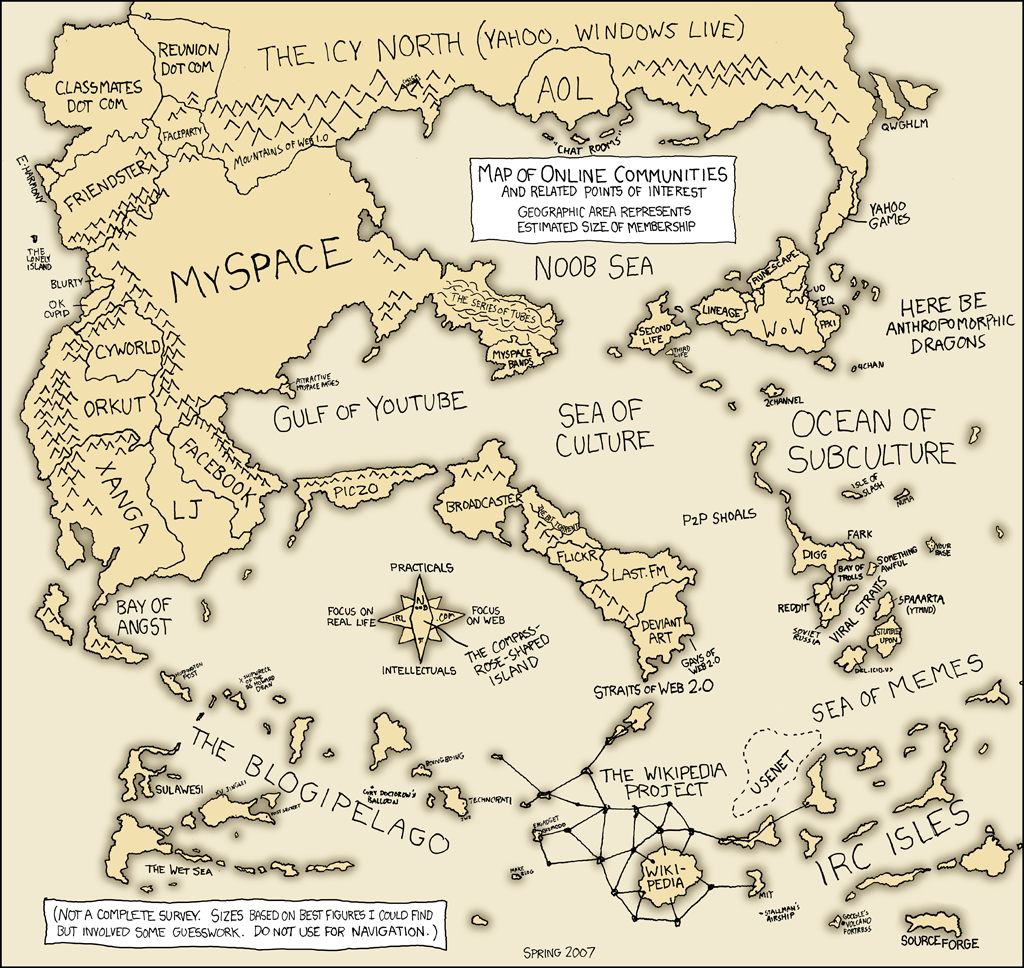
In the three-dimensional world, your social network is the system of contacts (personal and professional) that surrounds you. You chat with your network and make new friends. Your network gives you recommendations for new restaurants, bands, contractors and places to go on vacation. Professionally, you find out about new opportunities and get feedback on ideas. Your social network contains hundreds of people you know directly or through other friends and coworkers, and gives you access to interesting activities and useful information.
Online, social networking sites do the same things, and often with many of the same people. These sites are tools to expand those networks further and more easily than meeting at the diner or corner store ever could. People from around the world can come together to talk about politics or parenting or knitting and crochet. Through posts and discussions, reviews and comments, email and chat, these networking services offer another way to foster community and become part of a larger world.
Discovery Activity:
Explore some of the social networking services from the links above and below, or use your favorite search engine to find sites that match your interests. Think about what place an online community might have in your life, for fun or profit! Brainstorm three ways a social network could be useful to you or your institution, and write about it in your blog.
Here's a few more specific communities:
The Lone Arrangers, a community of solo librarians in all sorts of settings.
A Library 2.0 community.
TF Wiki, a wiki-based community for Transformers fans.
Network for Good, a place for donors, charities and volunteers to come together.
Loopt, a social network for your mobile device.
Go the Extra Mile:*
Choose one of your ideas and run with it. Join or create a community, and let us know about it in your blog. Include links, as appropriate.
* These are optional activities, if you want to take what you've learned one step further. They are *not* required.
As you can see, there are social networks for any possible interest or need. We'll explore a few more in Things 5 & 6. For now, jog on to Thing 5: Did You Read That Review?
First, some housekeeping:
- If you haven't sent me your Gmail address or blog address, please do. It's the only way I can give you credit for doing all those neat Things!
- If you've created your blog, please put up an initial post (even just saying, "Hi! I'm here!"). I can't add you to our blogroll until you do.
- A few of you have chosen to make your profiles private, which means that I can't see your blog information. That's fine, but then I truly do need you to email me your blog URL so I can keep track of it.
---------------------------------------
Now, back to social networks...
In the three-dimensional world, your social network is the system of contacts (personal and professional) that surrounds you. You chat with your network and make new friends. Your network gives you recommendations for new restaurants, bands, contractors and places to go on vacation. Professionally, you find out about new opportunities and get feedback on ideas. Your social network contains hundreds of people you know directly or through other friends and coworkers, and gives you access to interesting activities and useful information.
Online, social networking sites do the same things, and often with many of the same people. These sites are tools to expand those networks further and more easily than meeting at the diner or corner store ever could. People from around the world can come together to talk about politics or parenting or knitting and crochet. Through posts and discussions, reviews and comments, email and chat, these networking services offer another way to foster community and become part of a larger world.
Discovery Activity:
Explore some of the social networking services from the links above and below, or use your favorite search engine to find sites that match your interests. Think about what place an online community might have in your life, for fun or profit! Brainstorm three ways a social network could be useful to you or your institution, and write about it in your blog.
Here's a few more specific communities:
The Lone Arrangers, a community of solo librarians in all sorts of settings.
A Library 2.0 community.
TF Wiki, a wiki-based community for Transformers fans.
Network for Good, a place for donors, charities and volunteers to come together.
Loopt, a social network for your mobile device.
Go the Extra Mile:*
Choose one of your ideas and run with it. Join or create a community, and let us know about it in your blog. Include links, as appropriate.
* These are optional activities, if you want to take what you've learned one step further. They are *not* required.
As you can see, there are social networks for any possible interest or need. We'll explore a few more in Things 5 & 6. For now, jog on to Thing 5: Did You Read That Review?
Subscribe to:
Posts (Atom)